


ResortPass
4.9229.00 Reviews
App Specs
- Version
- 1.44.0
- Updated On
- License
- Free
- Downloads
- 100,000+
- Developer
- ResortPass
- Categories
- Travel & Local
- Platform
- Android
Screenshots

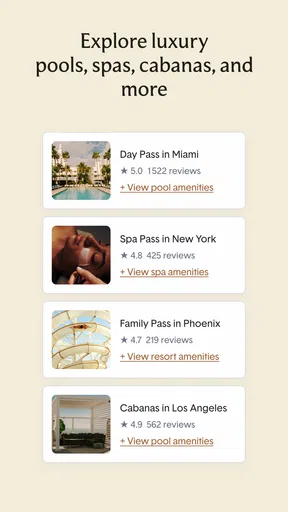
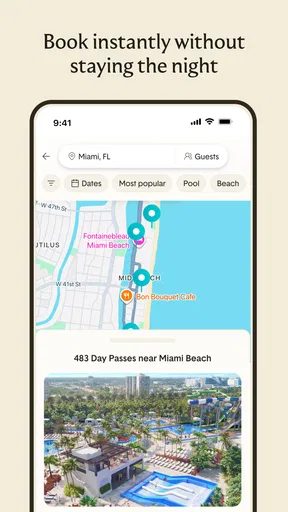

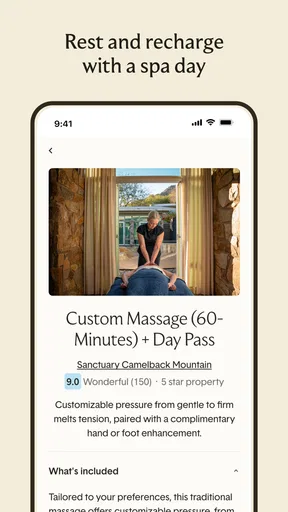
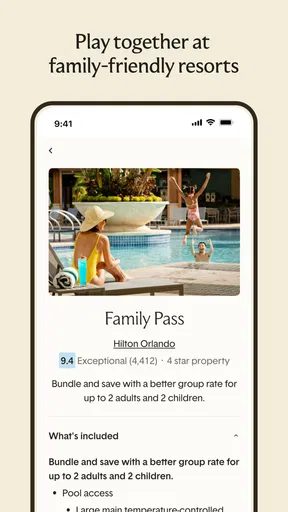
 Analysis by AppCompare
I like the idea behind ResortPass because it solves a very specific travel problem: enjoying a hotel pool, spa, beach area, or other resort facilities without booking an overnight room. In my experience, that makes the app most interesting for local day trips, spontaneous breaks, and travelers who want a resort-style afternoon without committing to a full hotel stay.
It is a free Travel & Local app from ResortPass, available to Everyone, and its focus is straightforward: find and arrange day access to hotels and resorts. The app has built a strong audience, with an average rating of 4.9 from around 2.1 thousand ratings and more than 100 thousand installs. Those figures suggest that the concept is easy to understand and useful to a sizable group of travelers, but the real question is whether it fits the way you plan a day.
How ResortPass works when your plans depend on a connection
The app is most valuable before you arrive at the property. I would use it while planning a weekend, checking what is available near a destination, or looking for something to do after arriving in a city. That planning stage matters because resort access is not the same as buying a general attraction ticket: the appeal depends on the specific property, the date, the type of access, and the facilities included.
A normal hotel search usually pushes you toward an overnight stay. ResortPass changes the decision by making a daytime visit the starting point. That is a useful distinction for families on a road trip, couples with a free afternoon, or residents who want a more polished pool day than a public facility can offer. I would not treat it as a replacement for a complete hotel-booking service, though. Its value is narrower and more focused.
Connectivity shapes the experience from the first search. You need a working connection to browse current resort options and compare what is available for your intended day. That can be easy at home, but less predictable when you are in a moving car, inside a large hotel, near a crowded beach, or traveling internationally. My practical advice is to do the important browsing and reservation work before leaving reliable Wi-Fi.
This is also where the app’s simplicity can work against it. A short search may look easy, but choosing the right day access still requires attention. I would read the listing carefully rather than assuming every resort visit includes the same facilities. A pool-focused pass, a spa-oriented visit, and access to broader amenities can represent very different experiences, even when they appear in the same search.
Why the mobile setting matters
The phone is a natural place for this kind of planning. I can imagine checking options during breakfast, sharing a possible day trip with friends, or searching for a pool near a hotel that does not offer the experience I want. The smaller screen is helpful for quick decisions, but it also encourages fast scrolling, which is exactly when a traveler can overlook an important detail.
Worth Reading Before You Choose

EA SPORTS FC Mobile 26 Is a Bigger Football Game, but It Takes Time

Flipboard Shows What News Apps Must Do Beyond the Feed

Switching to Android Auto Means Rethinking Your Driving Routine

Google Calendar Makes a Crowded Week Easier to Manage

Ludo King Makes the Most of the Minutes Between Plans

Baby Panda World Brings Quick Play to Modern Phones, but Its Game Library Feels Busy
My preferred workflow is to decide the basics first: the destination, the date, the number of people, and the kind of day I want. Then I would compare only a few realistic options instead of browsing endlessly. This reduces the chance of choosing a resort simply because its photos look appealing on a phone. Location and access details should matter as much as appearance.
ResortPass is particularly convenient for travelers who already know their schedule. If I have a free afternoon between activities, I can search for a nearby resort rather than reorganizing the entire trip. It is less compelling for someone who wants a completely unplanned day and expects to walk into any hotel facility without checking availability first.
Families should think about the mobile experience differently. A parent may be searching while managing luggage, children, or a changing itinerary. In that situation, the best use is to research before the busy part of the day begins and keep the final choice simple. I would avoid leaving the decision until everyone is already waiting in the car, because poor connectivity or a nearly full schedule can turn a relaxing idea into unnecessary stress.
For couples and solo travelers, the app can support a more flexible style of travel. A resort day can fill a gap between check-in and dinner, or provide a comfortable alternative to a crowded public beach. Still, the app cannot remove the practical limits of geography. A beautiful option that requires a long detour may be worse than a less glamorous property close to where you are staying.
What happens when the connection is unreliable
The biggest connectivity issue is not necessarily a dramatic failure. It is the small interruption that occurs while you are comparing choices, trying to complete a booking, or checking information shortly before arrival. A weak signal can make it difficult to know whether a page has fully loaded or whether your latest action went through. I would avoid repeating a payment or reservation action until I had checked the app and any confirmation message carefully.
That habit is especially important when traveling. Airports, underground parking areas, resort basements, and crowded event spaces are all places where a phone may behave unpredictably. My recommendation is simple: finish the reservation while connected to stable Wi-Fi or a strong mobile signal, then keep the confirmation details easy to find before heading out.
If the app becomes difficult to use at the property, I would switch from browsing mode to verification mode. In other words, do not start comparing new resorts at the entrance. First check the reservation information already associated with your visit, then ask the property staff for help if something appears unclear. The app helps organize the purchase, but the resort remains the physical place where access is actually delivered.
This distinction is one of the most important trade-offs. A traditional hotel booking often gives you a familiar reservation flow tied to an overnight room. ResortPass is more targeted, but a day pass can involve more attention to timing and facility expectations because you are visiting a property for a limited period. I find the app useful precisely when I accept that it is a planning tool for a specific experience, not a universal travel wallet.
For recovery, I would keep a sensible backup plan. Save the reservation information in a place you can reach easily, take a screenshot if that is practical, and note the property name and arrival date before leaving dependable connectivity. I am not treating that as a promise of offline functionality; it is simply good travel preparation. If your phone loses service, having already reviewed the essential details can prevent a minor network problem from becoming the main event.
Using the app without wasting mobile data
Resort discovery can encourage a lot of image browsing, repeated searches, and map checking. If you are on a limited mobile plan, I would do the exploratory part at home or in a hotel room with Wi-Fi. Search broadly there, compare the serious candidates, and leave mobile data for the final checks you genuinely need while moving around.
A useful approach is to separate research from execution. During the research phase, look at several nearby properties and decide what matters most: a convenient location, a particular type of facility, or a day that fits your schedule. During the execution phase, open only the selected option and review the reservation details. This is faster, less distracting, and kinder to a limited data allowance.
I would also avoid treating the app as a constant background travel companion. Its purpose is strongest at specific moments: choosing a resort, arranging access, and confirming the plan. Once that work is done, repeatedly reopening listings while you are already at the destination adds little value and may create confusion if availability changes.
Travelers crossing borders should be especially deliberate. Mobile data rules and signal quality can vary, so I would complete the important steps before crossing into an area where service may be expensive or inconsistent. ResortPass is free to install, but that does not mean every surrounding travel cost disappears. The day itself, transportation, and mobile connectivity remain separate parts of the budget.
Where it beats the usual alternatives
The usual alternatives are booking a hotel room, visiting a public pool or beach, using a spa directly, or searching the web for individual resort policies. Each option has a place. A hotel room makes more sense when you need a bed, luggage storage, or a full overnight base. A public facility may be better for a low-cost, casual swim. Direct booking can be preferable when you already know the property and want to deal with it without an intermediary search.
ResortPass is strongest when the day experience is the goal and you want to compare resort-style possibilities in one travel-focused app. That is a meaningful advantage for someone who does not know which hotels offer daytime access or who wants to turn a free block of time into a planned outing. It is also more convenient than calling multiple properties just to ask whether a day visit is possible.
Its weakness is the same as its specialization. If you need a complete itinerary, flights, rental cars, restaurant reservations, and overnight accommodation in one place, another travel app will be a better central hub. If you are already standing outside a known resort and only need a quick answer from that property, contacting the resort directly may be more efficient than beginning a new search.
I would also skip it when the destination is remote and the nearest resort is far away. A day pass does not automatically make a long journey worthwhile. The best match is a traveler who values the facility itself and can reach it without turning the day into a transportation project.
Who will get the most from it
In my view, ResortPass is a strong fit for people who want variety without paying for an overnight room. It can be useful for a local celebration, a family day during school holidays, a break from sightseeing, or a traveler whose accommodation lacks a pool or spa. It is also appealing when weather or energy levels make a resort day more attractive than following a packed city itinerary.
One realistic scenario would be a family staying in a basic apartment during a hot weekend. Instead of moving to a more expensive hotel for the entire trip, the parents could use the app to look for a resort day that fits one afternoon. They would still need to compare travel time, access details, and the children’s needs, but the app gives them a focused way to explore that alternative.
Another scenario is a delayed flight or late hotel check-in. A traveler may have several hours to fill but no desire to carry luggage through museums or sit in an airport lounge. A nearby resort day could be attractive if the timing and location work. I would confirm the schedule before relying on this plan, because a short window leaves little room for traffic, check-in delays, or connectivity problems.
The app is less suitable for travelers who dislike advance planning, want guaranteed access to every facility on a property, or are searching primarily for the cheapest possible outing. It may also disappoint someone expecting the atmosphere of a private hotel stay. Day access can provide a resort experience, but it does not turn a visitor into an overnight guest.
Version, accessibility, and everyday practicality
The app was released on August 5, 2021, and the current version is 1.44.0. It supports Android 7.0 and newer, which makes it accessible to people using a wide range of Android phones. That matters for travel because not everyone reserves a newer device for trips; some people rely on an older phone as their primary or backup handset.
The Everyone age rating also makes the app approachable for general household use. The rating is about the app’s content, of course, not a guarantee that every resort activity is suitable for every child. Parents should still judge the property, facilities, and day plan for themselves rather than treating the age label as a recommendation for a particular resort.
ResortPass is free, so trying the app does not require an upfront purchase. I see that as a practical advantage when you are only exploring an idea. The more important financial decision comes later, when you compare the selected day access with transportation, food, parking, and what you would otherwise spend on a hotel or attraction.
My final preparation routine would be: search on reliable Wi-Fi, compare the actual location with your itinerary, read the access information carefully, complete the reservation before departure, and keep the confirmation details available. Those steps address the main friction points without making the experience complicated.
My connectivity verdict
ResortPass works best when I treat it as a connected planning and booking companion, not as something to depend on casually at the last minute. Its central idea is genuinely useful: a resort day can be a separate travel experience, rather than an automatic consequence of booking a hotel room. The app makes that possibility easier to investigate, especially for local breaks and flexible itineraries.
The connectivity angle does not ruin the experience, but it rewards preparation. Search and comparison are better with a stable connection, and travelers should not assume that a weak signal at a resort will be convenient when they need reservation details. Doing the important work early makes the app feel simple; postponing everything until arrival makes it more fragile.
After using it as a focused travel tool, I would recommend it to anyone specifically looking for daytime resort access and willing to check the practical details before setting out. I would choose a broader travel app for a complete trip, a direct resort contact for a single known property, and a public facility for a simpler low-cost swim. For the right situation, though, ResortPass offers a smart middle ground: a way to plan a resort experience without turning it into an overnight commitment.
My recommendation is to use it before the day begins, while you have dependable connectivity and enough time to compare the choices. That is when its focused design is most helpful, and it is also the best way to avoid the small surprises that can take the relaxation out of a resort day.
Pros
- Easy booking for resort day passes and pool access.
- Useful filters help find resorts by location and amenities.
- Lets you enjoy hotel facilities without booking an overnight stay.
- Many listings include clear photos
- prices
- and available dates.
- Convenient for planning relaxing day trips or short local getaways.
Cons
- Availability can vary widely by date and resort.
- Some popular properties sell out quickly during peak seasons.
- Extra fees or service charges may increase the final price.
- Policies for cancellations
- weather
- and refunds differ by property.
- Not every listing includes access to all resort amenities.
FAQs for ResortPass
What is ResortPass and how does it work?
ResortPass is a booking platform that lets you reserve day-use access to hotel amenities without staying overnight. Depending on the property, you may book a pool pass, spa service, cabana, beach access, fitness facility, or another day experience. The app and website show available resorts, dates, prices, and included amenities before you complete a reservation.
Do I need to stay at the hotel to use a ResortPass booking?
No. ResortPass is designed primarily for day visitors, so you generally do not need an overnight reservation at the hotel. However, access rules vary by property and by pass type. Some locations may restrict certain facilities, require identification at check-in, or limit access to specific hours, so it is important to read the individual listing carefully before booking.
How much does ResortPass cost, and what is included?
Prices depend on the resort, location, date, number of guests, and the experience you choose. A basic pass may include access to a pool or beach, while premium options can include a cabana, food and beverage credit, spa treatment, parking, or fitness facilities. The listing should explain the inclusions, but extra purchases and resort fees may still apply.
Can I cancel or change a ResortPass reservation?
Cancellation and change policies are set by the individual resort and may differ considerably. Some bookings offer a full or partial refund when canceled before a stated deadline, while others are nonrefundable, especially for special events, cabanas, or spa appointments. Review the policy shown during checkout and contact ResortPass support or the property promptly if your plans change.
Is ResortPass available on both Android and iPhone?
ResortPass can be accessed through its mobile experience and official online platform, allowing users to browse and manage bookings from common Android and iPhone devices. Availability of a dedicated app may vary by region or change over time, so users should check Google Play or the App Store for the current official listing. Always verify the developer before downloading.


